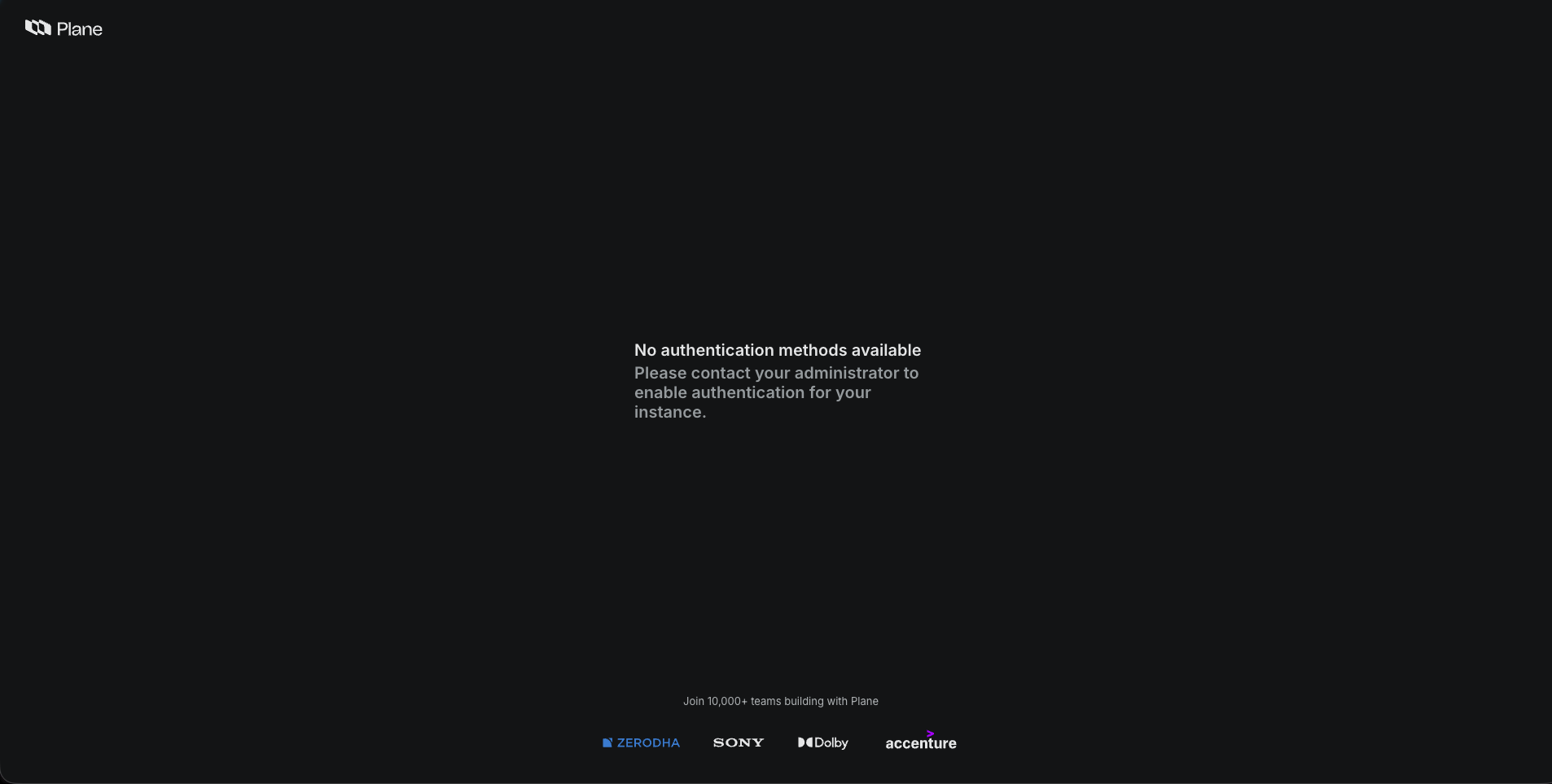
I’ve been trying to keep the system in its broken state for debugging, but it somehow started working again without the above listed manual recovery steps. It’s been about four days since the last pod restarts due to a recent Kubernetes maintenance/upgrade.
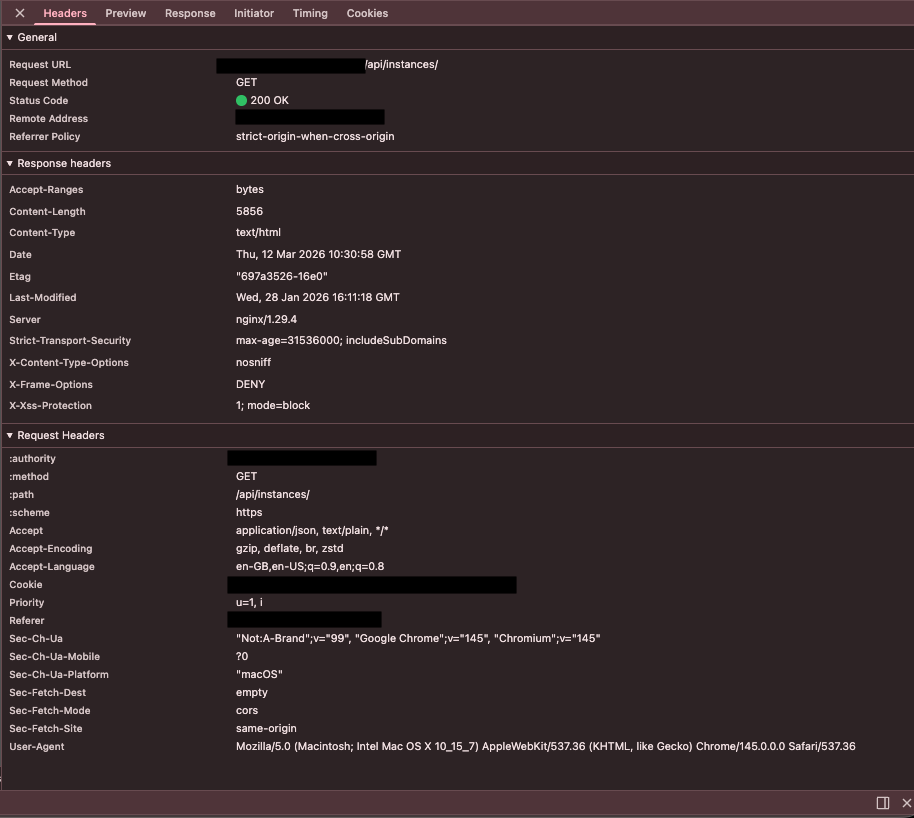
When it’s in the “No authentication methods available” screen state, the api/instances endpoint usually stops working and returns an HTML response instead of JSON. I would share the HTML output, but at the moment it’s working normally again and returning a proper JSON response.
Also, when the “No authentication methods available” screen appears, the API logs show this — not sure if it’s relevant:
[2026-03-12 06:52:41 +0000] [11621] [INFO] Booting worker with pid: 11621
/usr/local/lib/python3.12/site-packages/django/core/handlers/base.py:61: UserWarning: No directory at: /code/plane/static-assets/collected-static/
  mw_instance = middleware(adapted_handler)
Actually, I was just able to reproduce a similar state by restarting the API server and trying to access the frontend before the pod was fully ready(infact it’s persisting even after the pod is fully ready and browser cache cleared). This triggered the same “No authentication methods available” screen, and the api/instances endpoint again returned HTML instead of JSON.
Here’s a sample of the HTML response from the endpoint when in the broken state:
<!DOCTYPE html>
<html lang="en">
    <head>
        <meta charSet="utf-8"/>
        <meta name="viewport" content="width=device-width, initial-scale=1"/>
        <meta name="theme-color" content="#fff"/>
        <meta name="application-name" content="Plane"/>
        <meta name="apple-mobile-web-app-capable" content="yes"/>
        <meta name="apple-mobile-web-app-status-bar-style" content="default"/>
        <meta name="apple-mobile-web-app-title" content="Plane | Simple, extensible, open-source project management tool."/>
        <meta name="format-detection" content="telephone=no"/>
        <meta name="mobile-web-app-capable" content="yes"/>
        <title>Plane | Simple, extensible, open-source project management tool.</title>
        <meta name="description" content="Open-source project management tool to manage work items, cycles, and product roadmaps easily"/>
        <meta property="og:title" content="Plane | Simple, extensible, open-source project management tool."/>
        <meta property="og:description" content="Open-source project management tool to manage work items, cycles, and product roadmaps easily"/>
 ...
 ...
And here is a screenshot of the network tab:
I also just noticed the Response Headers.Server is nginx/1.29.4 though we are using traefik(this fact might be irrelevant as everything works fine when not in this state, just wanted to mention)
The api server does not append any logs when refreshing the frontend page in this state. Current api logs:
Waiting for database...
Database available!
No migrations Pending. Starting processes ...
Instance already registered
ENABLE_SIGNUP configuration already exists
ENABLE_EMAIL_PASSWORD configuration already exists
ENABLE_MAGIC_LINK_LOGIN configuration already exists
DISABLE_WORKSPACE_CREATION configuration already exists
GOOGLE_CLIENT_ID configuration already exists
GOOGLE_CLIENT_SECRET configuration already exists
ENABLE_GOOGLE_SYNC configuration already exists
GITHUB_CLIENT_ID configuration already exists
GITHUB_CLIENT_SECRET configuration already exists
GITHUB_ORGANIZATION_ID configuration already exists
ENABLE_GITHUB_SYNC configuration already exists
GITLAB_HOST configuration already exists
GITLAB_CLIENT_ID configuration already exists
GITLAB_CLIENT_SECRET configuration already exists
ENABLE_GITLAB_SYNC configuration already exists
IS_GITEA_ENABLED configuration already exists
GITEA_HOST configuration already exists
GITEA_CLIENT_ID configuration already exists
GITEA_CLIENT_SECRET configuration already exists
ENABLE_GITEA_SYNC configuration already exists
ENABLE_SMTP configuration already exists
EMAIL_HOST configuration already exists
EMAIL_HOST_USER configuration already exists
EMAIL_HOST_PASSWORD configuration already exists
EMAIL_PORT configuration already exists
EMAIL_FROM configuration already exists
EMAIL_USE_TLS configuration already exists
EMAIL_USE_SSL configuration already exists
LLM_API_KEY configuration already exists
LLM_PROVIDER configuration already exists
LLM_MODEL configuration already exists
GPT_ENGINE configuration already exists
UNSPLASH_ACCESS_KEY configuration already exists
IS_INTERCOM_ENABLED configuration already exists
INTERCOM_APP_ID configuration already exists
OIDC_CLIENT_ID configuration already exists
OIDC_CLIENT_SECRET configuration already exists
OIDC_TOKEN_URL configuration already exists
OIDC_USERINFO_URL configuration already exists
OIDC_AUTHORIZE_URL configuration already exists
IS_OIDC_ENABLED configuration already exists
OIDC_LOGOUT_URL configuration already exists
OIDC_PROVIDER_NAME configuration already exists
ENABLE_OIDC_IDP_SYNC configuration already exists
SAML_ENTITY_ID configuration already exists
SAML_SSO_URL configuration already exists
SAML_CERTIFICATE configuration already exists
SAML_LOGOUT_URL configuration already exists
IS_SAML_ENABLED configuration already exists
SAML_PROVIDER_NAME configuration already exists
ENABLE_SAML_IDP_SYNC configuration already exists
SAML_DISABLE_REQUESTED_AUTHN_CONTEXT configuration already exists
IS_LDAP_ENABLED configuration already exists
LDAP_SERVER_URI configuration already exists
LDAP_BIND_DN configuration already exists
LDAP_BIND_PASSWORD configuration already exists
LDAP_USER_SEARCH_BASE configuration already exists
LDAP_USER_SEARCH_FILTER configuration already exists
LDAP_USER_ATTRIBUTES configuration already exists
LDAP_PROVIDER_NAME configuration already exists
IS_GOOGLE_ENABLED configuration already exists
IS_GITHUB_ENABLED configuration already exists
IS_GITLAB_ENABLED configuration already exists
IS_GITEA_ENABLED configuration already exists
Checking bucket...
Bucket 'uploads' exists.
Cache Cleared
Successfully triggered the sync license on startup task
[2026-03-12 10:24:55 +0000] [1] [INFO] Starting gunicorn 23.0.0
[2026-03-12 10:24:55 +0000] [1] [INFO] Listening at: http://0.0.0.0:8000 (1)
[2026-03-12 10:24:55 +0000] [1] [INFO] Using worker: uvicorn.workers.UvicornWorker
[2026-03-12 10:24:55 +0000] [194] [INFO] Booting worker with pid: 194
/usr/local/lib/python3.12/site-packages/django/core/handlers/base.py:61: UserWarning: No directory at: /code/plane/static-assets/collected-static/
  mw_instance = middleware(adapted_handler)